Flutter组件基础——Button

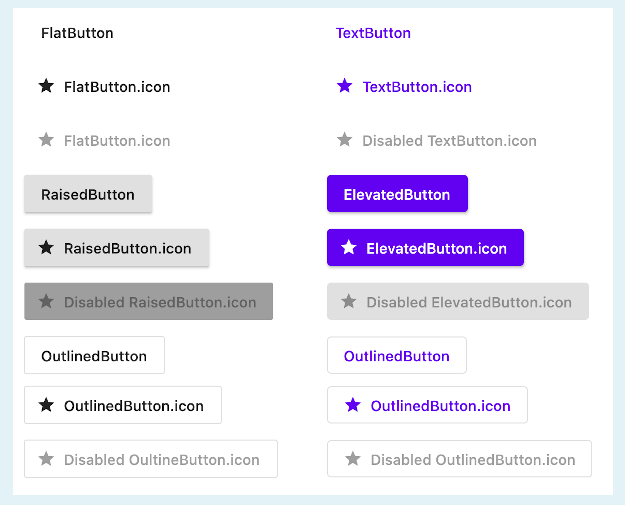
Flutter中常用的Button有ElevatedButtonTextButtonOutlinedButton,之前可能还有RaisedButtonFlatButtonOutlineButton,但是已被废弃,参考RaisedButton vs ElevatedButton, FlatButton vs TextButton and OutlineButton vs OutlinedButton

TextButton

TextButton可简单理解为按钮,即可点击的Text

常用属性如下:

  • TextButton常用属性:
    • autofocus
    • child
    • clipBehavior
    • enabled
    • focusNode
    • onLongPress
    • onPressed
    • style

来看一下,定义三个按钮,分别对应,按钮不可点击,按钮可点击,按钮带有渐变背景,三种情况,效果如下:
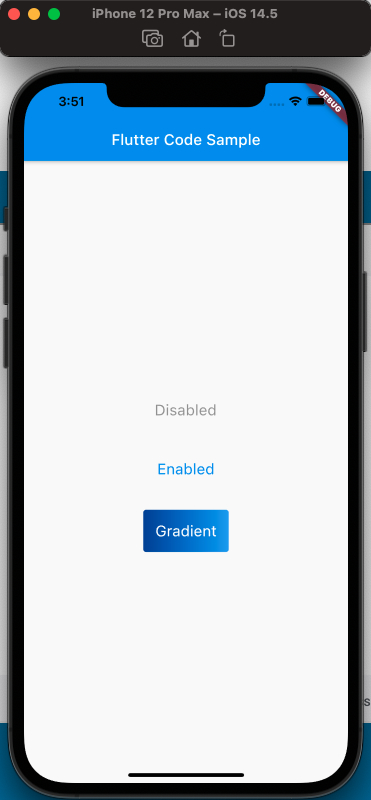
wecom20210727-155121.png

使用代码如下:

1
2
3
4
5
6
7
8
9
10
11
12
13
14
15
16
17
18
19
20
21
22
23
24
25
26
27
28
29
30
31
32
33
34
35
36
37
38
39
40
41
42
43
44
45
46
47
48
49
50
51
52
53
54
55
56
57
58
59
60
61
62
63
64
65
66
67
68
69
70
71
72
73
74
75
76
77
78
79
80
81
82
83

class MyApp extends StatelessWidget {
const MyApp({Key? key}) : super(key: key);

static const String _title = 'Flutter Code Sample';

@override
Widget build(BuildContext context) {
return MaterialApp(
title: _title,
home: Scaffold(
appBar: AppBar(
title: const Text(_title),
),
body: const MyStatelessWidget(),
));
}
}

class MyStatelessWidget extends StatelessWidget {
const MyStatelessWidget({Key? key}) : super(key: key);

@override
Widget build(BuildContext context) {
return Center(
child: Column(
mainAxisSize: MainAxisSize.min,
children: [
TextButton(
onPressed: null,
child: const Text('Disabled'),
style: TextButton.styleFrom(
textStyle: const TextStyle(fontSize: 20),
),
),
const SizedBox(
height: 30,
),
TextButton(
onPressed: () {},
child: const Text('Enabled'),
style: TextButton.styleFrom(
textStyle: const TextStyle(fontSize: 20),
),
),
const SizedBox(
height: 30,
),
ClipRRect(
borderRadius: BorderRadius.circular(4),
child: Stack(
children: [
Positioned.fill(
child: Container(
decoration: const BoxDecoration(
gradient: LinearGradient(
colors: [
Color(0xFF0D47A1),
Color(0xFF1976D2),
Color(0xFF42A5F5),
],
),
),
),
),
TextButton(
onPressed: () {},
child: const Text('Gradient'),
style: TextButton.styleFrom(
padding: const EdgeInsets.all(16.0),
primary: Colors.white,
textStyle: const TextStyle(fontSize: 20),
),
),
],
),
)
],
),
);
}
}

注意渐变按钮的实现,使用了Stack

ElevatedButton

  • ElevatedButton的属性:
    • autofocus
    • child
    • clipBehavior
    • enabled
    • focusNode
    • key
    • onLongPress
    • onPressed
    • style

代码如下:

1
2
3
4
5
6
7
8
9
10
11
12
13
14
15
16
17
18
19
20
21
22
23
24
25
26
27
28
29
30
31
32
33
34
35
36
37
38
39
40
41
42
43
44
45
46
47
48
49
50
51
52
53
54
55

class MyApp extends StatelessWidget {
const MyApp({Key? key}) : super(key: key);

static const String _title = 'Flutter Code Sample';

@override
Widget build(BuildContext context) {
return MaterialApp(
title: _title,
home: Scaffold(
appBar: AppBar(
title: const Text(_title),
),
body: const MyStatefulWidget(),
));
}
}

class MyStatefulWidget extends StatefulWidget {
const MyStatefulWidget({Key? key}) : super(key: key);

@override
State<MyStatefulWidget> createState() => _MyStatefulWidgetState();
}

class _MyStatefulWidgetState extends State<MyStatefulWidget> {
@override
Widget build(BuildContext context) {
final ButtonStyle style =
ElevatedButton.styleFrom(textStyle: const TextStyle(fontSize: 20));

return Center(
child: Column(
mainAxisSize: MainAxisSize.min,
children: [
ElevatedButton(
onPressed: null,
child: const Text('Disabled'),
style: style,
),
const SizedBox(
height: 30,
),
ElevatedButton(
onPressed: () {},
child: const Text('Enabled'),
style: style,
)
],
),
);
}
}

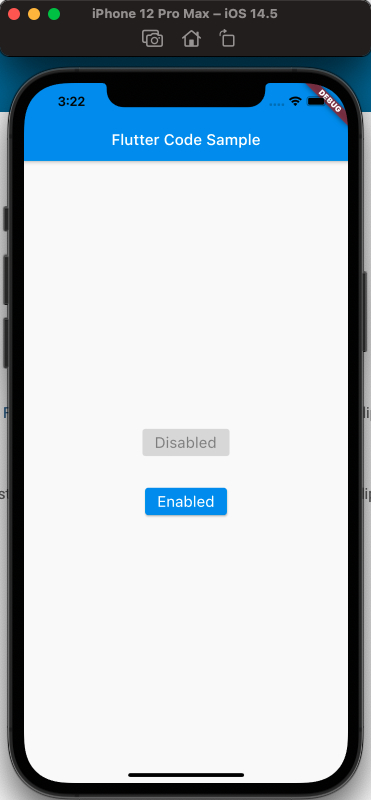
效果如下:

wecom20210729-152206.png

OutlinedButton

  • OutlinedButton的属性如下:
    • autofocus
    • child
    • clipBehavior
    • enabled
    • focusNode
    • key
    • onLongPress
    • onPressed
    • style

代码如下:

1
2
3
4
5
6
7
8
9
10
11
12
13
14
15
16
17
18
19
20
21
22
23
24
25
26
27
28
29
30
31
32
33
34
35

class MyApp extends StatelessWidget {
const MyApp({Key? key}) : super(key: key);

static const String _title = 'Flutter Code Sample';

@override
Widget build(BuildContext context) {
return MaterialApp(
title: _title,
home: Scaffold(
appBar: AppBar(
title: const Text(_title),
),
body: const Center(
child: MyStatelessWidget(),
),
),
);
}
}

class MyStatelessWidget extends StatelessWidget {
const MyStatelessWidget({Key? key}) : super(key: key);

@override
Widget build(BuildContext context) {
return OutlinedButton(
onPressed: () {
print('Received Click');
},
child: const Text('Click Me'));
}
}

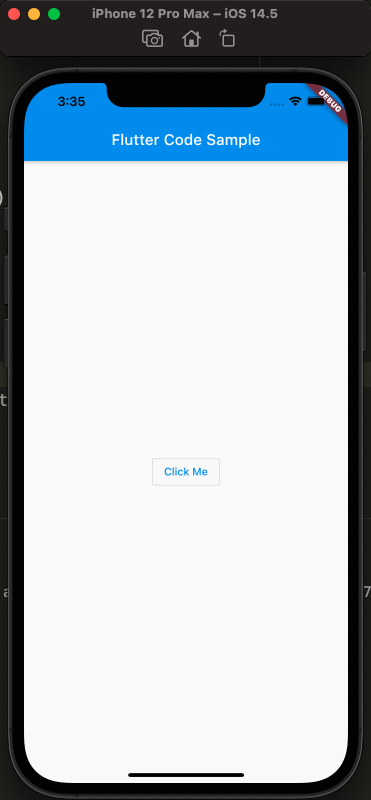
样式如下:

wecom20210729-153515.png

Ps: 可以试一下点击效果!

各个Button样式的对比:

h4u7k.png

参考

Text Button Api Doc
ElevatedButton Api Doc
OutlinedButton Api Doc
RaisedButton vs ElevatedButton, FlatButton vs TextButton and OutlineButton vs OutlinedButton