播放锁屏通知栏显示
背景
播放音频时,希望通知界面能显示,且能控制音频播放。由于之前需求是进入后台时播放暂停,所以每次打开通知界面时,播放就暂停,看不到类似于音乐播放器那样的效果。后来发现,去除进入后台暂停代码后,通知界面就可以显示播放器,但是不能控制、且没有进度。
实现
支持后台播放
首先需要 APP 支持后台播放,即,一方面去除进入后台播放暂停的代码逻辑;另一方面,设置 Target -> Signing & Capabilities 中,添加 Backgroud Modes,打开 Audio, AirPlay, and Picture in Picture。图片如下:
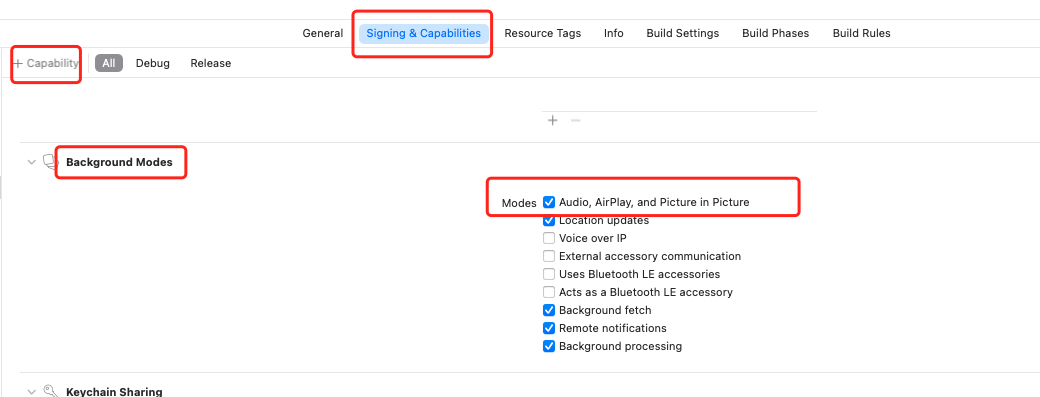
注意设置AVAudioSession,播放前根据实际需要设置,播放后关闭
AVAudioSessionCategory类型
| Category类型 |
当按”静音”或者锁屏时是否静音 |
是否可以和其他支持混音的 APP 混合播放 |
是否支持后台 |
场景举例描述 |
| AVAudioSessionCategoryAmbient |
是 |
是 |
否 |
常用于 APP 的背景音,比如玩游戏时还可以听音乐 |
| AVAudioSessionCategorySoloAmbient |
是 |
否 |
否 |
同样是背景音,但是用于玩游戏时不想听音乐的场景 |
| AVAudioSessionCategoryPlayback |
否 |
默认不可以,但可支持 |
是 |
音乐播放,锁屏时还能听音乐 |
| AVAudioSessionCategoryRecord |
否 |
否,只能录音 |
是 |
录音机,录音时,其他音乐不能播放 |
| AVAudioSessionCategoryPlayAndRecord |
否 |
默认可以,即可以录音也可以播放 |
是 |
边播边录,比如 VOIP 这样的场景 |
| AVAudioSessionCategoryAudioProcessing |
否 |
否,硬件解码音频,不能播放和录制 |
是 |
用于音频格式处理 |
| AVAudioSessionCategoryMultiRoute |
否 |
是,多种输入输出 |
否 |
耳机、USB 设备同时播放 |
AVAudioSessionCategoryOption类型
| CategoryOption类型 |
描述 |
适用类别 |
| AVAudioSessionCategoryOptionMixWithOthers |
支持和其他APP 混合播放 |
AVAudioSessionCategoryPlayAndRecord、AVAudioSessionCategoryPlayback、AVAudioSessionCategoryMultiRoute |
| AVAudioSessionCategoryOptionDuckOthers |
调低其他 APP 音频音量,突出本 APP 的音量 |
AVAudioSessionCategoryPlayAndRecord、AVAudioSessionCategoryPlayback、AVAudioSessionCategoryMultiRoute |
| AVAudioSessionCategoryOptionAllowBluetooth |
支持蓝牙音频输入 |
AVAudioSessionCategoryRecord、AVAudioSessionCategoryPlayAndRecord |
| AVAudioSessionCategoryOptionDefaultToSpeaker |
设置默认输出音频到扬声器 |
AVAudioSessionCategoryPlayAndRecord |
| AVAudioSessionCategoryOptionInterruptSpokenAudioAndMixWithOthers |
App 偶尔有用到音频播放,且播放时停止其他应用音频 |
AVAudioSessionCategoryPlayback、AVAudioSessionCategoryPlayAndRecord、AVAudioSessionCategoryMultiRoute |
| AVAudioSessionCategoryOptionAllowBluetoothA2DP |
支持立体声蓝牙 |
AVAudioSessionCategoryPlayAndRecord |
| AVAudioSessionCategoryOptionAllowAirPlay |
支持 AirPlay 设备 |
AVAudioSessionCategoryPlayAndRecord |
1
2
3
4
5
6
7
8
9
10
11
12
13
14
|
func setupAudioSession() {
do {
try AVAudioSession.sharedInstance().setActive(true, options: AVAudioSession.SetActiveOptions.notifyOthersOnDeactivation)
try AVAudioSession.sharedInstance().setCategory(AVAudioSession.Category.playback, options: AVAudioSession.CategoryOptions.duckOthers)
} catch {
print("set AudioSession error: %@", error)
}
}
|
锁屏通知栏显示
APP 支持后台播放后,可以看到在通知栏已经有显示了,但是播放时没有进度,没有标题,没有图片,只有 APP 的名字和 小Icon。而要修改这些信息的代码如下:
1
2
3
4
5
6
7
8
9
10
11
12
13
14
15
16
17
18
19
20
21
22
23
24
25
26
27
28
29
30
| #import <MediaPlayer/MPNowPlayingInfoCenter.h>
#import <MediaPlayer/MPRemoteCommandCenter.h>
#import <MediaPlayer/MPRemoteCommand.h>
#import <MediaPlayer/MPMediaItem.h>
- (void)updateNowPlaingInfo {
NSMutableDictionary *dict = [NSMutableDictionary dictionary];
[dict setValue:@"Title" forKey:MPMediaItemPropertyTitle];
[dict setValue:@"Artist" forKey:MPMediaItemPropertyArtist];
[dict setValue:@"AlbumTItle" forKey:MPMediaItemPropertyAlbumTitle];
MPMediaItemArtwork *artwork = [[MPMediaItemArtwork alloc] initWithImage:ArtImage];
[dict setValue:artwork forKey:MPMediaItemPropertyArtwork];
NSTimeInterval duration = self.player.duration;
[dict setValue:[NSNumber numberWithDouble:duration] forKey:MPMediaItemPropertyPlaybackDuration];
NSTimeInterval currentTime = self.player.currentTime;
[dict setValue:[NSNumber numberWithDouble:currentTime] forKey:MPNowPlayingInfoPropertyElapsedPlaybackTime];
[dict setValue:@(1.0) forKey:MPNowPlayingInfoPropertyPlaybackRate];
[[MPNowPlayingInfoCenter defaultCenter] setNowPlayingInfo:dict];
}
|
而如果想要播放完成后,不在通知栏显示,则可如下设置
1
2
3
|
[[MPNowPlayingInfoCenter defaultCenter] setNowPlayingInfo:@{}];
|
设置通知栏控制播放的暂停、上集、下集,通过设置MPRemoteCommandCenter中的属性可以控制对应功能是否打开,而响应事件的处理有两种方法:
- 方法一,通过
remoteControlReceivedWithEvent:方法,响应对应事件
- 方法二:通过
MPRemoteCommandCenter的Command来addTarget来处理对应事件
设置通知栏对应功能是否打开的代码如下:
1
2
3
4
5
6
7
8
9
10
11
12
13
14
15
16
17
18
19
20
21
22
23
24
25
26
27
28
|
[[UIApplication sharedApplication] beginReceivingRemoteControlEvents];
[self becomeFirstResponder];
- (void)setupCommandCenter {
MPRemoteCommandCenter *commandCenter = [MPRemoteCommandCenter sharedCommandCenter];
[commandCenter.playCommand removeTarget:self];
[commandCenter.pauseCommand removeTarget:self];
commandCenter.previousTrackCommand.enabled = NO;
commandCenter.nextTrackCommand.enabled = NO;
commandCenter.playCommand.enabled = YES;
commandCenter.pauseCommand.enabled = YES;
commandCenter.togglePlayPauseCommand.enabled = NO;
commandCenter.changePlaybackPositionCommand.enable = YES;
}
|
响应事件处理方法一的代码如下:
1
2
3
4
5
6
7
8
9
10
11
12
13
14
15
16
17
18
19
20
21
22
23
24
25
26
27
28
29
30
31
32
33
34
|
- (void)remoteControlReceivedWithEvent:(UIEvent *)event {
if (event.type == UIEventTypeRemoteControl) {
switch (event.subtype) {
case UIEventSubtypeRemoteControlPlay:
{
NSLog(@"RemoteControlEvents: play");
}
break;
case UIEventSubtypeRemoteControlPause:
{
NSLog(@"RemoteControlEvents: pause");
}
break;
case UIEventSubtypeRemoteControlTogglePlayPause:
NSLog(@"耳机控制:暂停||播放");
break;
case UIEventSubtypeRemoteControlNextTrack:
{
NSLog(@"RemoteControlEvents: next");
}
break;
case UIEventSubtypeRemoteControlPreviousTrack:
{
NSLog(@"RemoteControlEvents: previous");
}
break;
default:
break;
}
}
}
|
响应事件处理方法二的代码如下:
1
2
3
4
5
6
7
8
9
10
11
12
13
14
15
16
17
18
19
20
21
22
23
24
25
26
27
28
29
30
31
32
33
|
- (void)setupCommandCenter {
MPRemoteCommandCenter *commandCenter = [MPRemoteCommandCenter sharedCommandCenter];
[commandCenter.playCommand addTargetWithHandler:^MPRemoteCommandHandlerStatus(MPRemoteCommandEvent * _Nonnull event) {
NSLog(@"play");
return MPRemoteCommandHandlerStatusSuccess;
}];
[commandCenter.pauseCommand addTarget:self action:@selector(handlePauseCommand:)];
[commandCenter.changePlaybackPositionCommand addTarget:self action:@selector(handlePlaybackPositionCommand:)];
}
- (MPRemoteCommandHandlerStatus):(id)sender {
NSLog(@"pause");
return MPRemoteCommandHandlerStatusSuccess;
}
- (MPRemoteCommandHandlerStatus)handlePlaybackPositionCommand:
(MPChangePlaybackPositionCommandEvent *) event
{
[self.palyer seekToTime:CMTimeMakeWithSeconds(event.positionTime, 1)];
NSLog(@"changePlaybackPosition to %f", event.positionTime);
return MPRemoteCommandHandlerStatusSuccess;
}
|
问题
不添加beginReceivingRemoteControlEvents时,是否会显示通知栏,是否影响两种方法处理
响应事件处理方法二的响应会走两次
自定义播放的进度和通知栏的进度不一致
参考